Two cats on stage
A gray cat and a fluffy cat share the orange stage, trading playful gestures beneath the hanging microphone. Soft fur contrasts with the bold background.
Example previewUnlock Pro
Get 5,000 credits & priority queue


Hotel Lobby AI brings two performers, an orange stage and the original song into a rap-style video idea. Explore duet examples, prepare separate photos for the left and right subjects, then choose a model and output settings. Generation is open for testing; results are still being qualified.
Get a paid credit pack or subscription to turn off watermarks and download HD
Orange stage ยท Duet
Videos and images you generate will appear here in real-time. Start creating!
Two cats on stage
A gray cat and a fluffy cat share the orange stage, trading playful gestures beneath the hanging microphone. Soft fur contrasts with the bold background.
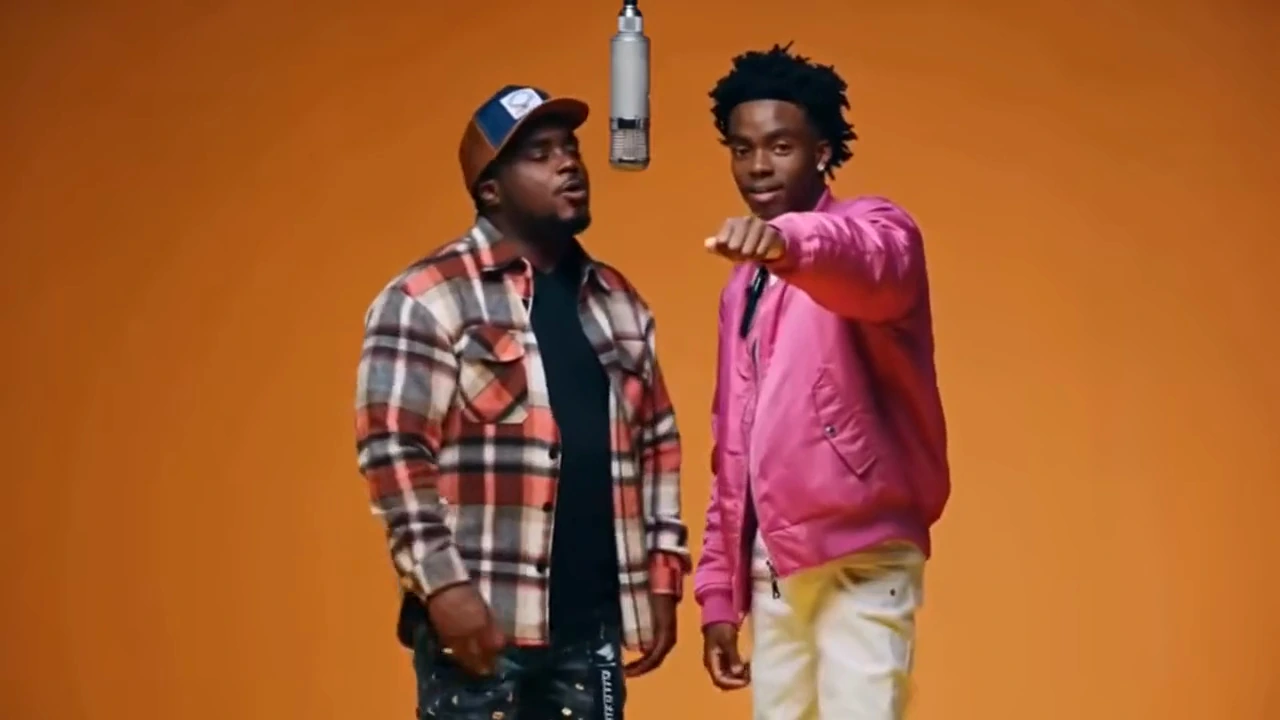
Example previewStreetwear pairing
A checked jacket meets a bright pink shirt as two performers trade moves with a bold streetwear look. Distinct outfits keep the duo easy to follow.
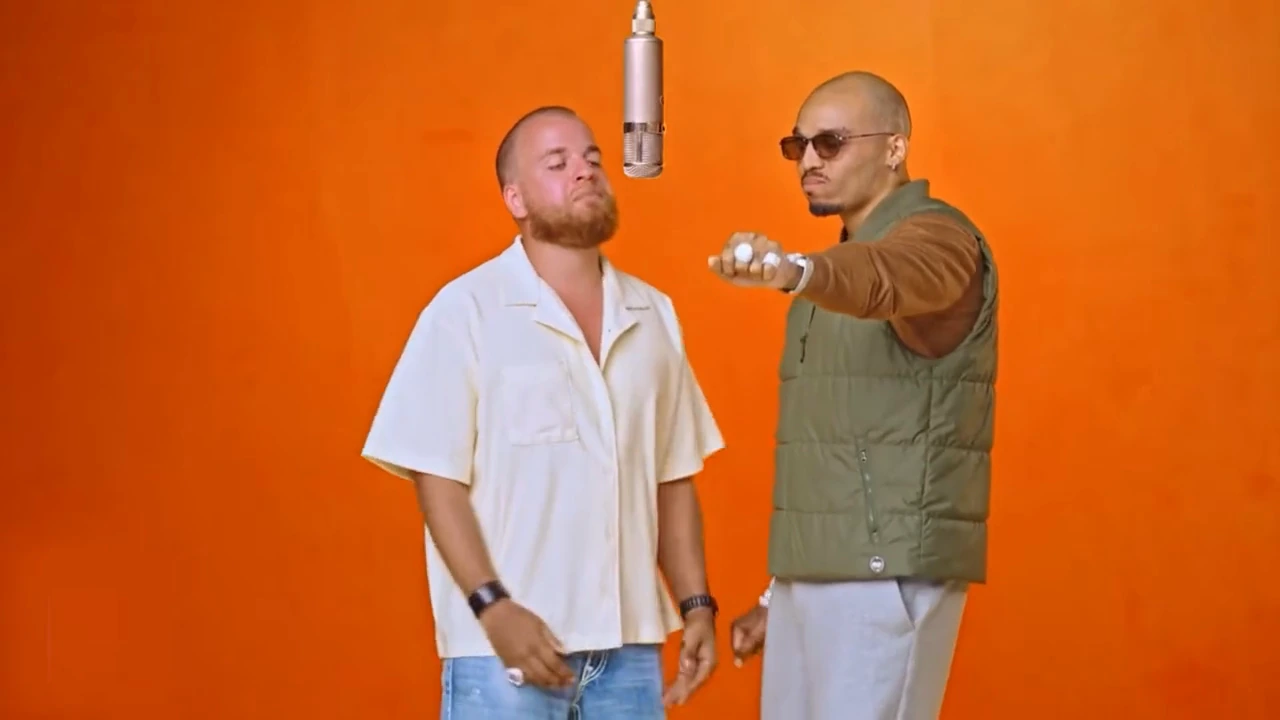
Example previewBest friends duet
A light shirt and a green jacket set the tone for a relaxed duet with plenty of stage presence. Casual outfits bring a friendly feel to the performance.
Example previewBaby dragon duet
Gold and dark baby dragons bring expressive faces, detailed scales and lively wings to a fantasy duet. Their contrasting colors make each character stand out.
Example previewSix duos, six stage styles. Explore friends, pets and animated characters to find inspiration for your own pairing.
A gray cat and a fluffy cat share the orange stage, trading playful gestures beneath the hanging microphone. Soft fur contrasts with the bold background.
Gold and dark baby dragons bring expressive faces, detailed scales and lively wings to a fantasy duet. Their contrasting colors make each character stand out.
A checked jacket meets a bright pink shirt as two performers trade moves with a bold streetwear look. Distinct outfits keep the duo easy to follow.
A light shirt and a green jacket set the tone for a relaxed duet with plenty of stage presence. Casual outfits bring a friendly feel to the performance.
A suit and traditional clothing create a distinctive pairing, with expressive gestures adding personality to the orange booth. Different silhouettes give each performer a clear presence.
Contrasting hair colors and dark costumes distinguish two anime characters in an animated performance on the orange stage. Expressive poses complete the character-inspired scene.
Compare the scene and interaction to choose photos and judge the full performance.

01 / 02The orange wall and floor provide a simple backdrop, and the microphone anchors the composition. Outfits, height differences and gestures add personality. Compare subject spacing in the examples and check whether the microphone remains between them.
Each upload supplies one performer. The left slot sets the intended left subject, and the right slot sets the other. Faces, hairstyles and clothing distinguish their identities. Check the finished clip for swapped positions, blended faces and overlapping bodies.
Compare the scene and interaction to choose photos and judge the full performance.
The orange wall and floor provide a simple backdrop, and the microphone anchors the composition. Outfits, height differences and gestures add personality. Compare subject spacing in the examples and check whether the microphone remains between them.

Each upload supplies one performer. The left slot sets the intended left subject, and the right slot sets the other. Faces, hairstyles and clothing distinguish their identities. Check the finished clip for swapped positions, blended faces and overlapping bodies.

Prepare photos, choose settings, then review playback.
Choose one subject per image, with visible faces and similar lighting. Check the upload order and previews. Leave room around the head and shoulders so the crop preserves useful identity details.
Prepare photos, choose settings, then review playback.
Choose one subject per image, with visible faces and similar lighting. Check the upload order and previews. Leave room around the head and shoulders so the crop preserves useful identity details.
Begin with Seedance 2.0, ten seconds and 720p. Adjust the model, duration, resolution or aspect ratio, and review the credit estimate. Check the options again after changing models.
When generation is available, watch the full clip before downloading. Inspect identities, hands, positions and the microphone. Change one factor at a time so you can understand which adjustment helped.
Preparing Hotel Lobby AI photos starts with recognizable detail. A clear original gives you more to work with than a heavily filtered or enlarged thumbnail.
For Hotel Lobby AI, use evenly lit photos with visible eyes, nose and mouth. Avoid sunglasses, masks, obstructing hair and backlighting. Enlarging a blurred selfie cannot recover missing identity detail.
Match viewing angles and crops in your Hotel Lobby AI references. A head-only portrait leaves clothing and body details to be invented. Upper-body photos provide more context; extreme pose differences make comparison harder.
Crop Hotel Lobby AI photos to remove nearby people, large borders and stickers while preserving the chin and hairstyle. One clear subject makes it easier to compare each performer with the correct upload.
Hotel Lobby AI settings change the output specification and estimated credit cost. Source quality and stable motion remain separate things to inspect.
| Setting | Starting point | What to check |
|---|---|---|
| Model | Starting point:Start your Hotel Lobby AI setup with Seedance 2.0; compare Standard, Fast or Mini. | What to check:Switching models changes the available settings. Keep the same photos when comparing versions. |
| Duration | Starting point:Try a shorter performance before choosing a longer clip. | What to check:The default model panel offers four to fifteen seconds. Check identity across the entire selected length. |
| Resolution | Starting point:Review a Hotel Lobby AI draft at 720p before choosing a larger export. | What to check:Higher resolution increases the estimate and output size. It does not guarantee better faces or repair motion artifacts. |
| Aspect ratio | Starting point:Landscape gives two performers more room; portrait suits a tall screen. | What to check:Check bodies, gestures and the microphone after reframing. Leave space for captions. |
Choose a relationship and mood for your duo.

01 / 03Use Hotel Lobby AI for a playful introduction or group-chat idea. Everyday outfits feel familiar; contrasting colors distinguish the performers. Agree on photos with the people shown, and keep captions away from faces and hands.
A family Hotel Lobby AI duet can pair different ages and outfits on the same stage. Match photo clarity and preserve hairstyles and clothing. Review body proportions and reactions when combining close and wider portraits.
Hotel Lobby AI examples of cats, dragons and anime suggest different colors, silhouettes and styles. Pet and illustrated-character inputs still require separate testing. A showcase cannot establish reliable generation for every input type.
Choose a relationship and mood for your duo.
Use Hotel Lobby AI for a playful introduction or group-chat idea. Everyday outfits feel familiar; contrasting colors distinguish the performers. Agree on photos with the people shown, and keep captions away from faces and hands.
A family Hotel Lobby AI duet can pair different ages and outfits on the same stage. Match photo clarity and preserve hairstyles and clothing. Review body proportions and reactions when combining close and wider portraits.
Hotel Lobby AI examples of cats, dragons and anime suggest different colors, silhouettes and styles. Pet and illustrated-character inputs still require separate testing. A showcase cannot establish reliable generation for every input type.
Reviewing a Hotel Lobby AI clip means checking identity and movement separately from export resolution.
If identities drift in a Hotel Lobby AI clip, recheck the upload order and use clearer, unobstructed photos. Compare the beginning, middle and end. Higher resolution cannot guarantee that similar faces remain separate.
Inspect larger gestures in your Hotel Lobby AI video for duplicate fingers, overlapping bodies or extra microphones. Shorter tests and simpler photos make problems easier to spot. Review the full performance, not just its poster.
Preview Hotel Lobby AI at the intended screen size and check cropping and captions. Listen as well as watch. The original song does not guarantee lip sync; inspect details, then replay at normal speed.
Choose a different format when you want a self-confrontation scene or a flexible reference-based video.
Build a cinematic face-off from a recent portrait and a younger photo.
Open the self-confrontation video toolUse reference images or footage for broader video concepts with model-specific controls.
Explore reference-to-video toolsReview available plans and credit options before starting another video project.
View pricing and creditsPractical answers about inputs, controls, cost and availability.
Two photos ยท One duet
Upload a photo for each performer, choose your model and output settings, and create a Hotel Lobby AI video with the original soundtrack.
Video generation uses credits. Review the estimate before submitting.
Upload a photo for each performer, choose your model and output settings, and create a Hotel Lobby AI video with the original soundtrack.
Video generation uses credits. Review the estimate before submitting.