





The Tiny Desk AI trend puts one person's face on the lead performer of a desk-side band clip. People make them of themselves, of friends, and of anyone who would look good behind a keyboard.
FastMoro AI is not affiliated with, sponsored by, or endorsed by NPR or Tiny Desk. "Tiny Desk" is used here only to describe the Tiny Desk-style trend format.
You don't need editing skills or prompt writing to make one of these clips. FastMoro AI has a ready-made Tiny Desk AI Video Generator that does the casting for you from a single photo. Below, we go through how the template works, which portraits give clean results, the steps to generate, and what to check before you post.
How the Tiny Desk AI Effect Works
It helps to know what the effect does before you spend credits. The tool is a fixed template built on a 15-second desk-side band reference clip. Your photo replaces only the lead performer at the red keyboard, and only their face and hair.
Everything else comes from the reference clip: the other band members, the room, the camera shots, the movements and the musical timing. The video keeps the reference clip's original soundtrack at normal speed. The effect page describes it as an Outstanding Tiny Desk AI template: you are not building a scene from scratch, you are stepping into one that already exists.
Because the template is fixed, a few things are not available:
- Group casting. Only one person can be cast. You cannot add a second person or replace the other musicians.
- Song choice. You cannot pick a different song or upload your own audio.
- Length and format. The clip cannot be made longer, shorter or horizontal.
If you would like to try other ready-made templates, the full list is in the FastMoro AI effects catalog.
Photo Requirements and Preparation
Since the effect only takes the face and hair from your photo, those are the parts the picture needs to show well.
The upload accepts JPG, PNG, WebP and HEIC files up to 4 MB. You upload one portrait. There is no prompt to write and no model settings to configure.
What makes a good portrait
- One person. A group photo does not cast multiple people.
- Head and shoulders. A sharp portrait from the chest up shows the face at a usable size.
- Face and hair fully visible. Leave some space around the hair and chin instead of cropping tight.
- Even light. Soft, even lighting on the face works better than strong shadows from one side.
- Permission. Use a photo you have permission to upload, especially if it is of a friend.
What to avoid
Sunglasses, masks, heavy filters, tiny faces and overlapping people all make it harder to carry the likeness into the clip. If your only good picture has one of these problems, taking a new portrait is the simpler fix.
Step-by-Step: Making Your Concert Clip
Once you have a clear portrait, the process itself is short.
-
Sign in. Open the Tiny Desk AI Video Generator. You need to sign in to create.
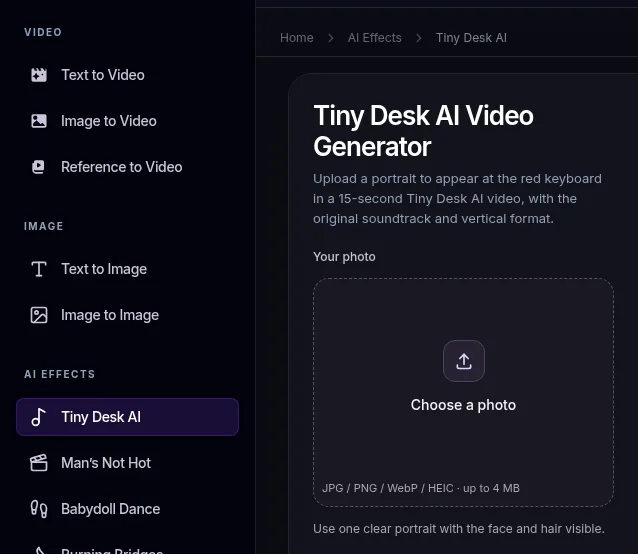
Tiny Desk AI is listed under AI Effects in the sidebar; the generator opens with the upload box.
-
Upload your portrait. Choose one JPG, PNG, WebP or HEIC file up to 4 MB. There are no text boxes or settings to fill in.
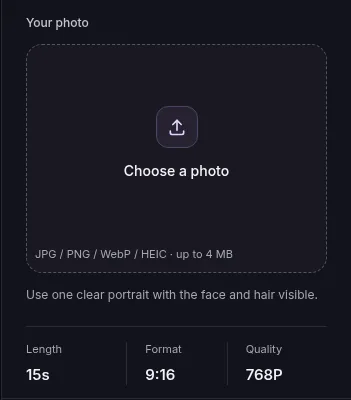
You upload one portrait; length, format and quality are fixed.
-
Generate. Each generation costs 110 credits. If you need more credits, the options are on the pricing page.
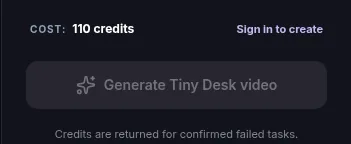
Each generation costs 110 credits; signed-out visitors see "Sign in to create".
-
Follow the task. Follow the task in My creations. Credits are returned when a task is confirmed failed.
-
Watch and download. When the video is ready, watch it all the way through. Downloading the finished video needs a paid credit pack or a subscription; without one, you can't download it.
Quality Checks Before You Share
Likeness, expressions and fine details can vary, so it is worth a careful look before the clip goes out. The reference clip moves between several shots, which gives you natural checkpoints.
- The face across all shots. Pause on each camera change and make sure the face and hair still match your photo.
- Hands and instruments. Look at the hands on the red keyboard and around the other instruments for blurred or merged fingers.
- Picture and sound. Play the full 15 seconds and check that the picture and the original soundtrack run all the way through together.
If the face drifts in one of the shots, try again with a sharper, evenly lit portrait.
Ideas for Your Clip
Since the setup is always the same, the fun is in who you cast. A friend's birthday, a group chat joke or a bandmate you want to surprise all make good subjects, as long as you have their permission to use the photo. You can also make a few versions with different people from the same template and post them side by side, since every clip shares the same 15-second performance and soundtrack.
Frequently Asked Questions
Is this an NPR or Tiny Desk product?
No. FastMoro AI is not affiliated with, sponsored by, or endorsed by NPR or Tiny Desk. The name is only used to describe the Tiny Desk-style trend.
Can I put two or more friends in the band?
No. Only one person can be cast. Your photo replaces the lead performer at the red keyboard, and the other band members stay as they are in the reference clip.
Can I choose a different song?
No. The clip keeps the reference clip's original soundtrack at normal speed, and song choice is not available.
What does the finished video look like?
It is a 15-second vertical 9:16 video at 768P with the reference clip's original soundtrack.
What happens to my credits if a task fails?
Each generation costs 110 credits. Credits are returned when a task is confirmed failed. You can follow every task in My creations.
For a full-body dance version from one photo, see how to make the Babydoll dance AI video.