VectorCraft is a free, open-source vector illustration editor created under the ArtCraft banner. Written in pure Rust, it provides an independent desktop workspace for drawing and manipulating two-dimensional vector graphics on macOS, Windows, Linux, and FreeBSD, as well as in web browsers through WebAssembly. The software creates and edits vector paths locally on your computer rather than operating as an automated text-to-vector generative algorithm.
For digital illustrators, graphic designers, and layout artists, VectorCraft centers on local document workflows and established desktop conventions. It gives creators an accessible environment for drawing scalable iconography, designing event posters, and preparing multi-layered artwork without requiring mandatory cloud accounts, network logins, or recurring subscription fees.
Origins and ArtCraft Background
VectorCraft is developed as part of the broader ArtCraft Crafting Apps initiative. The suite comprises multiple dedicated creative programs, including PhotoCraft for raster image manipulation and FilmCraft for editing multi-track video timelines. VectorCraft serves as the vector illustration workbench across this family, drawing direct inspiration from classic Adobe Illustrator workspace paradigms while remaining an independent, clean-room implementation. It is an independent implementation, not an Adobe product or a fork of Adobe source code.
The engineering team follows several consistent principles across the entire suite of desktop applications. Each tool is built as a native desktop program in pure Rust rather than packaged inside an Electron web wrapper, ensuring direct operating system integration and keeping document files stored locally on the user's hard drive. In addition, the applications retain familiar professional tool arrangements, dockable inspectors, and keyboard shortcuts recognizable to users of traditional commercial software. The program source code is distributed under a dual permissive license, allowing each user to choose between the MIT license and the Apache-2.0 license.
Beyond standalone desktop tools, ArtCraft explores controllable visual creation systems. In an essay titled World Models for Film signed by Brandon Thomas, the team discusses using three-dimensional spatial coordinates, virtual camera placement, and scene continuity to give creators predictable steering over generative visual workflows. That publication provides helpful context on the team's overarching software philosophy: combining structured spatial environments with direct user control. VectorCraft covers a different part of creative work: editing drawings and arranging their individual elements in a local document.
The applications share these principles, while each has its own repository and development progress. VectorCraft's progress can be followed through its public releases.
Current Version and Development Progress
Early public builds of VectorCraft were published in early October 2026. Since those initial tags, development has progressed rapidly through several documented checkpoints that expanded foundational drawing, panel docking, and document exchange capabilities:
| Version | Published Date | Documented Additions |
|---|---|---|
| v0.3.0 | 2026-10-06 | Added EPS import and export, print engine and dialog, PDF color conversion and profiles, and data recovery |
| v0.5.0 | 2026-10-08 | Refined live corners, variable font styles, Layers panel hierarchy, Pen modifiers, collapsible docks, and GPU selection |
| v0.9.0 | 2026-10-11 | Improved PDF and AI import, missing font reporting, placed-link packaging, threaded text, and Windows graphics startup behavior |
Despite this swift release cadence, VectorCraft remains in an active alpha stage. The foundational toolset handles basic drawing, typography, and object manipulation, but several technical areas are under ongoing construction. Layer hierarchies from commercial Illustrator documents can encounter translation mismatches, advanced 3D shading materials and complex raster filtering pipelines are not yet fully implemented, and non-Latin typography rendering and Windows graphics startup coverage continue to receive active improvements. VectorCraft represents an evolving open-source project rather than an all-inclusive replacement for commercial illustration suites.
Understanding this development phase helps set practical expectations. The software is ready for evaluating vector drawing techniques and creating straightforward illustrations, while high-volume commercial production pipelines will want to review format interchange before adopting it for complex client deliverables.
What the Workspace Lets You Do
Launching VectorCraft presents a layout structured around familiar graphic design conventions. A central working canvas displays your active artboards, surrounded by an editing toolbar on the left and contextual properties on the right. Collapsible dock panels house controls for Layers, Appearance, Color Swatches, and Object Properties, enabling you to inspect and modify paths without navigating cumbersome nested menus.
Drawing and Arranging Shapes
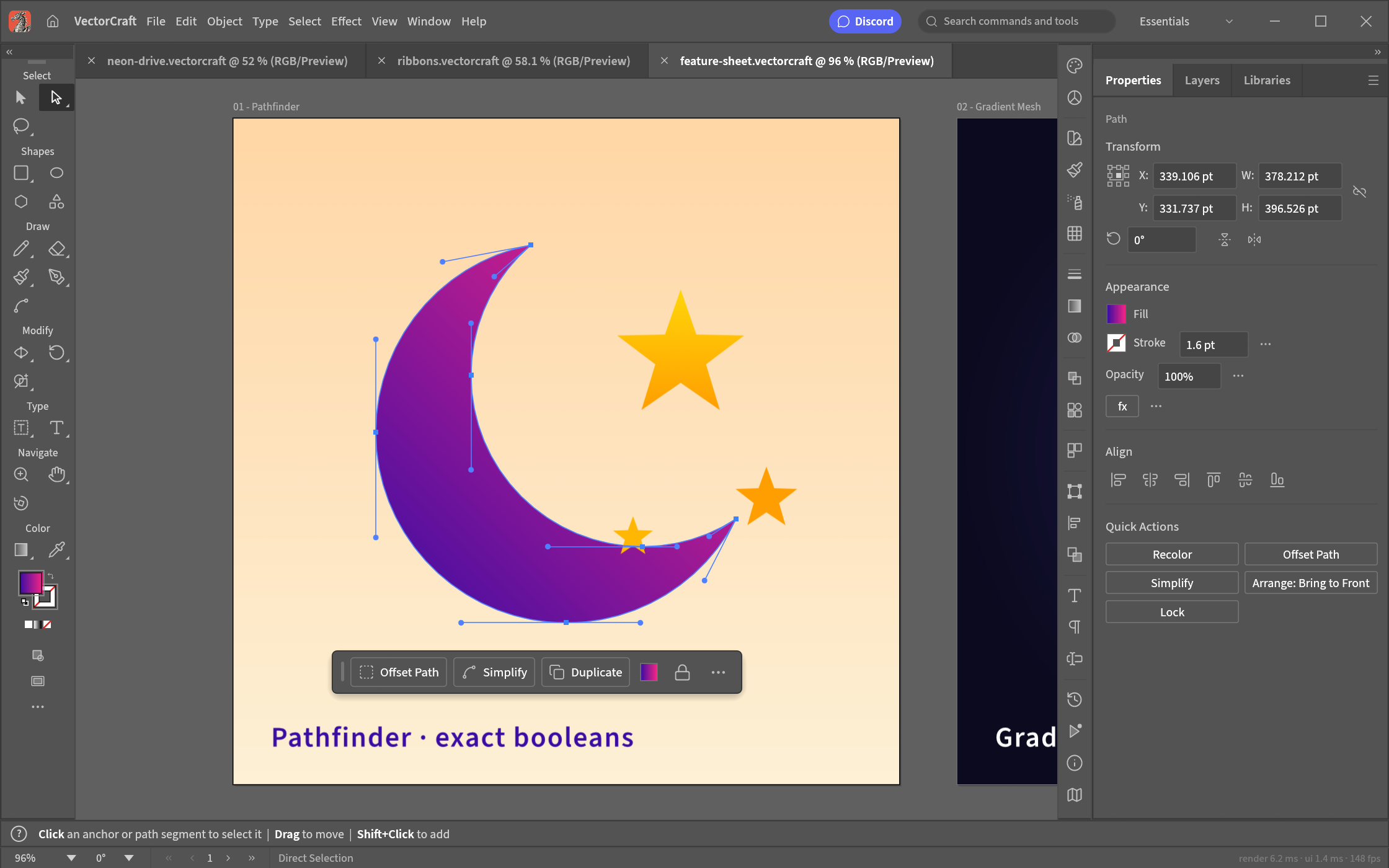
The software provides standard vector drawing controls, centered on the classic Pen tool and the Direct Selection arrow. Illustrators can place anchor points along the canvas and manipulate directional Bezier handles to construct open contours or closed shapes. To combine geometric primitives, VectorCraft provides Boolean Pathfinder operations alongside an interactive Shape Builder tool. These operators make it simple to merge, subtract, or intersect overlapping silhouettes—such as subtracting one overlapping circle from another to produce a clean crescent moon. Alignment buttons, dynamic Smart Guides, object snapping options, and structured layer folders assist in arranging visual elements across complex multi-object layouts.
Credit: ArtCraft / VectorCraft contributors
Color, Typography, and Live Appearances
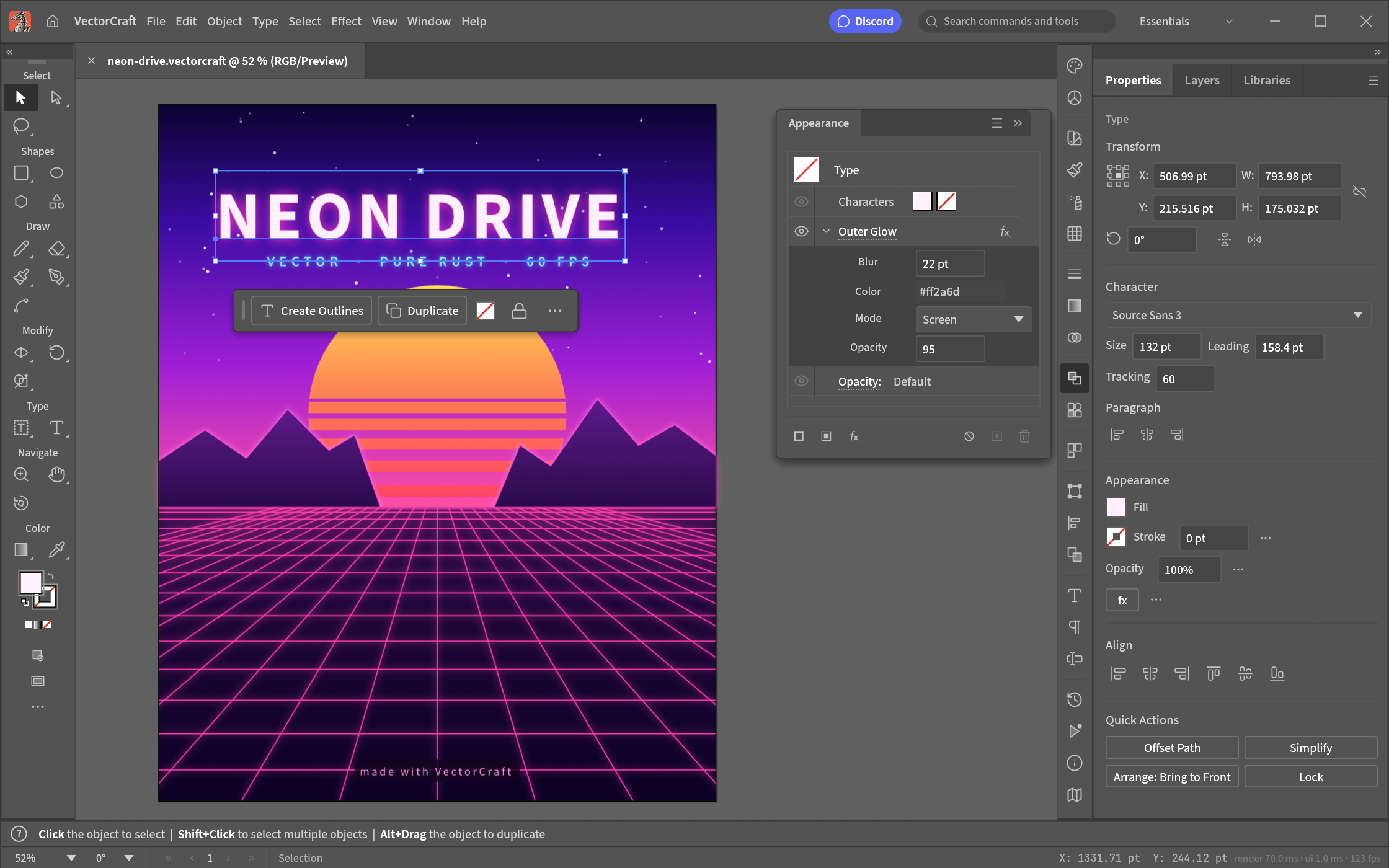
Styling is organized around a multi-attribute Appearance workflow. Designers can assign multiple solid fills, gradient ramps, and variable-width strokes to any selected path. The engine also supports non-destructive live styling effects, including Drop Shadow and Outer Glow. Text tools allow users to format area typography, thread copy across text frames, and bind type along arbitrary curved paths. Because underlying typography remains live beneath applied styling, you can adjust letter spacing or alter live Outer Glow parameters on a poster headline without rasterizing or flattening the text.
Credit: ArtCraft / VectorCraft contributors
Alongside interactive graphical manipulation, VectorCraft includes modular command dispatch mechanisms. The core document engine can receive editing instructions through a command-line interface, structured JSON messages, or Model Context Protocol (MCP) integrations. This headless architecture allows external developer scripts and automated tooling to read document trees, insert geometric shapes, and trigger batch exports programmatically.
Image Tracing and File Compatibility
Converting external graphical assets into editable vector outlines is a regular requirement in illustration projects. VectorCraft provides tools to digitize visual assets alongside open file import pipelines.
Image Tracing Capabilities
The v0.9.0 release documents an integrated Image Trace engine capable of converting placed raster graphics into editable vector paths. Users can choose among several tracing modes, including Black and White, Grayscale, Color, and a dedicated Flat Logo setting. The Flat Logo mode is tailored specifically for flat-color graphics with crisp edges, rather than continuous-tone photographs or smooth gradients.
Image tracing generates path approximations of the source image's tonal boundaries and edges. Merely saving a raster file with an .svg extension or exporting a wrapper does not turn pixels into vector geometry. For practical results, begin with high-contrast artwork featuring simple silhouettes and clean backgrounds. Preview the tracing adjustments, run Make and Expand, and inspect the resulting paths. After expanding, you can remove stray anchor points, smooth rough contours, and replace autotraced letterforms with real editable text.
File Formats and Compatibility Limits
VectorCraft saves its native working documents in a JSON-based .vectorcraft format. For asset exchange with other software, it supports importing and exporting SVG and PDF files, importing and exporting PDF-compatible .ai files, and exporting raster graphics to PNG, JPEG, and WebP using Export for Screens. It also incorporates read support for select Affinity files (.af, .afdesign, .afpub, and .afphoto), preserving a subset of native elements, though it does not export native Affinity formats.
When exchanging files with other creative software, certain format limitations apply. When exporting an .ai file, VectorCraft does not write proprietary Illustrator private editing data; as a result, complex layer structures, live effect parameters, or nested group properties may not round-trip identically. Furthermore, SVG files can contain embedded bitmaps as well as paths, so check whether the elements you need to resize are actually vectors.
Where to Start When You Have No Source Artwork
When beginning a design assignment without pre-existing corporate logos or photographic plates—such as creating an artisan coffee botanical package label—you can construct reference assets using generative tools before drawing your final artwork.
The FastMoroAI text-to-image studio can provide a visual starting point. A useful prompt might request a simple coffee branch with leaves and berries, a few flat colors, a white background and no lettering. Select a result with clear contours before bringing it into the editor. If the initial layout needs compositional adjustment, running the graphic through FastMoroAI image-to-image helps refine spacing, line balance, and color regions.
The generated reference is a raster image, so its outlines still need to be traced or redrawn as paths. After exporting the concept image, place it into VectorCraft. From there, you can trace the silhouette using the Flat Logo mode or manually draft crisp vector paths over the guide using the Pen tool. Once the primary botanical outlines are expanded and simplified, add the brand name as editable text, separate from the illustration.
Downloads and Practical Fit
VectorCraft is accessible through the official download portal. Users can install the software via the unified ArtCraft Launcher or retrieve standalone installers and portable archives for Windows, macOS (DMG), and Linux distributions. ArtCraft also provides a downloadable WebAssembly package for individuals wishing to self-host the editor in a web browser, though this archive requires personal hosting setup rather than serving as a managed public web app.
The user interface supports numerous languages, including English, German, French, Spanish, Italian, Russian, Ukrainian, Japanese, and Chinese. In the v0.9.0 release, Chinese UI menus are supported, though some system and error messages remain in English.
VectorCraft is an appealing workbench for independent creators, open-source enthusiasts, and illustrators who require standard vector tools on Linux, macOS, or Windows without paying recurring monthly licensing fees. It also serves technical teams building automated drawing scripts via its JSON and MCP hooks. Conversely, print operations that rely on specialized proprietary plug-in extensions, complex CMYK ink separations, or lossless Illustrator round-trip file exchanges will want to evaluate the software thoroughly before moving a complex project.
Trying VectorCraft on Your Own Work
VectorCraft offers a practical option for designers who want a familiar vector editing environment in an open-source, locally run application. By implementing traditional Pen, pathfinder, and appearance controls in a native Rust desktop program, it provides an accessible workbench for everyday vector illustration and asset production.
If you want to evaluate how the editor handles in practice, begin with a small, concrete project. Drawing a simple icon set, preparing an experimental poster headline, or tracing a clear logo silhouette will give you a clear sense of its anchor point editing, appearance tools, and file export workflow.